


Print and apply labeling is the most common approach to meet GS1-128 barcode requirements. This automated industrial process combines label printing and application in a continuous operation:


CIJ Printers (Continuous Inkjet)
chevron_right
Thermal Transfer Overprinters
chevron_right
Large Character High Resolution Piezo
chevron_right
Laser Coders
chevron_right
Print and Apply Labeling Machines
chevron_right
Thermal Inkjet
chevron_right
Valvejet Large Character
chevron_right
Supplies
chevron_right

Industrial Label Printers - Print and Apply Systems
Automated label printing for cases, boxes, trays, and pallets. GS1-compliant label printing machines for industrial traceability.
- Eliminating manual intervention
- Ensuring consistent code placement at high line speeds
Markem-Imaje industrial label printers deliver efficient and reliable GS1-compliant barcodes, shipping labels, traceability codes, and serialized identifiers directly onto products, bundles, and mixed-format packaging.
The technology is standard across food and beverage, pharmaceutical, logistics, and industrial manufacturing where automated label application is required for supply chain compliance and regulatory traceability. Markem-Imaje print and apply labeling systems are engineered for seamless integration into high-throughput production and distribution environments worldwide.
Please complete all fields below and we will reply to you as quickly and efficiently as possible. Thank you.
| Text, barcodes, and graphic coding 2d codes | ✔ |
| Maximum print speed - Line speed | ✔ |
| Code print quality | ✔ |
| OEM integration | ✔ |
| Camera scanning options | ✔ |
| Substrates | ✔ |
| Label positions | ✔ |
| Application method | ✔ |
| Product contact | ✔ |
| Safety guarding required | ✔ |
Industrial Label Printers for GS1-compliant production lines
Markem-Imaje print and apply labeling systems cover the full spectrum of industrial label printing applications - from single-face case and box labeling machine configurations to multi-side and full GS1-compliant pallet label printer formats.
Each system integrates directly into existing production lines through a wide range of interchangeable applicators, accommodating different product shapes, sizes, and line configurations without requiring significant engineering changes at commissioning. As an automatic label applicator, each unit supports real-time variable data updates - enabling label content changes between SKUs without stopping the line - ensuring consistent, accurate coding across high-throughput operations.
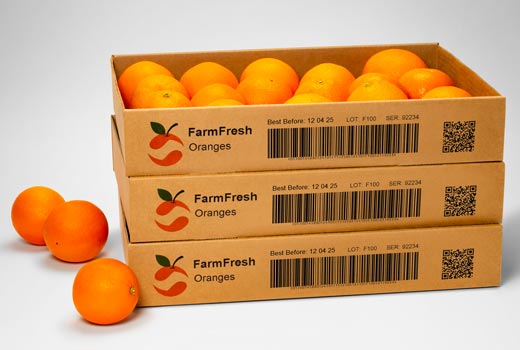
Markem-Imaje industrial label printers meet GS1 barcode standards for case and pallet identification, supporting supply chain traceability and regulatory compliance requirements across food and beverage, pharmaceutical, and logistics manufacturing environments.
What is a print and apply labeling system?
A print and apply labeling system uses the thermal transfer digital printing technology to print fixed and variable information onto a self-adhesive label which is then automatically placed onto boxes, trays, or pallets. Unlike manual labeling, print and apply labelers ensure consistent label placement and accurate data at high line speeds — eliminating human error and supporting GS1-compliant traceability across food and beverage, pharmaceutical, and logistics supply chains.
Why is labelling important in the pharmaceutical industry?
In pharmaceutical manufacturing, accurate labeling is a regulatory requirement, not just an operational one. Labels must carry lot numbers, expiration dates, serialized identifiers, and GS1-compliant barcodes to meet FDA, EU FMD, and global traceability standards. Print and apply labeling systems ensure that labels are printed and applied consistently at line speed, reducing the risk of mislabeling, product recalls, and compliance failures across primary and secondary pharmaceutical packaging operations.
What is the difference between direct thermal and thermal transfer printing?
Direct thermal and thermal transfer are two common printing methods used in print and apply labeling systems. Direct thermal printing applies heat directly to a direct thermal label to produce the required information. No ribbon or ink is required. It is ideal for short-to-medium-life applications or well-controlled environments. Common applications include the retail, logistics and dairy industries. Thermal transfer printing uses a thermal ribbon positioned between the label material and the printhead. Heat from the printhead transfers ink from the thermal transfer ribbon onto the label, producing more durable codes on a wider range of packaging materials. Thermal transfer labels are ideal for long-term high-quality and full code compliance are needed.
How does a print and apply labeling machine work?
A print and apply labeling machine is typically made up of a label printer, label handling unit, and a label applicator. The system operates in two stages: fixed and variable information are first printed onto a self-adhesive label, then the printer label is automatically applied onto products and product packaging with precision. Print and apply offers a range of application methods to suit the wide variety of production methods and products, including blow, tamp, tamp-blow, synchronous feed and wipe.
Testimonials
All
MORE FILTERS
LESS FILTERS
print and apply labeling
DOWNLOAD PDF
mi-btn mi-btn--primary-color-01 mi-btn--small mi-btn--fixed-bottom
REQUEST A QUOTE
mi-btn mi-btn--primary-color-02 mi-btn--small mi-btn--fixed-bottom
/en/contact-us
Find your product
add
MORE FILTERS
-
Expert Insider: How the Print and Apply (P&A) labeler is helping companies adapt to current and emerging challenges
Print and Apply is at an interesting point in its development. As the biggest global solutions provider of the Print and Apply labeler, we are seeing some notable changes. -
How to choose a Print and Apply applicator
Print and apply is a labeling system made up of a label printer, label handling unit, and a label applicator. It enables manufacturers to create and place labels directly onto products and product packaging. Label types can vary widely and can include barcodes, product information, tractability data, branding, and serialization.
Late-stage customization gets personal with new automated print look-up
Coding and marking equipment for direct printing has proven an extremely reliable, low-maintenance and cost-effective way to apply text, logos, and barcodes to corrugated containers and other Traded Unit secondary packages. In addition to other advances in print quality, resolution, ink-clogging prevention and reliability, a new feature in our 1000 Series TIJ (Thermal Inkjet) printer brings even greater efficiency: TU (Traded Unit) Look-up.
TU Look-up is a way to meet new data-heavy challenges such as GS1-compliant barcodes, store-brand personalization, and smarter automation. In turn, it can help you increase line throughput and improve traceability from the end of your line through warehousing and distribution.
This new feature makes it easier and faster to get printing, whether you have frequent job changes or even multiple SKUs (Stock Keeping Units) feeding to a single printer. It works on corrugate, plastic, metal, or wood, with the package coming to the unit only needing to have a pre-printed barcode identifying its specific SKU.
How does it work?
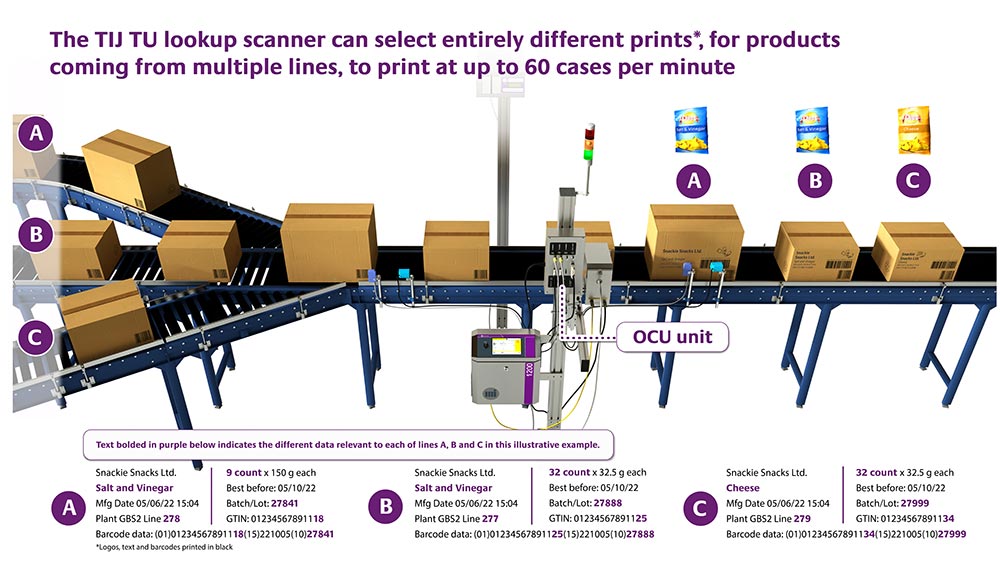
Take the case of a packed corrugated box. As it approaches the printer, the scanner will scan the pre-printed barcode identifying the SKU and send the associated data to the onboard controller. The controller then looks up the SKU in its data table, automatically identifies all the information fields and printheads needed for the job, and the printer runs the job. For quality assurance, you can add up to two verification scanners and an automatic rejection feature.
The new technology allows you to add value to customers’ packaging from barcode data to text and artwork, for example:
- A laundry detergent brand or co-packer that does private labeling can print, for instance, boxes for store brands that include custom logos and text, including any required GTINs (Global Trade Item Numbers).
- A potato chip company may label three varieties of chips, such as one for salt & vinegar, one for nacho cheese and another for sour cream & onion. In this case, personalization might include a logo as well as a GTIN.
- A produce company might be running three lines to package carrots, apples, and bananas. If the company wants to feed all three to a single printer station, a TU Look-up-enabled printer can handle the job and will automatically “know” if they have different expiry dates specific to each SKU — it is all in the look-up table.
You can now more efficiently print your outer cases with any data, text and decoration to satisfy your customers’ needs as well as meet any regulatory requirements.
TU Look-up solutions
TU Look-up has been available for years in our 5000 Series large character high-resolution piezo inkjet printers. These models work excellent in fast-moving food production, beverage, and pharmaceutical industries. The direct-printing piezo equipment suits extremely high-resolution printing and adhesion for the most demanding supply chain efficiency and traceability requirements.
Now, TU Look-up comes to our 1000 Series TIJ printers which are also used in these industries, and are ideal for case coding, but in lower-volume or intermittent applications. Both models in this series offer high-resolution codes and ease of use and maintenance.
The great benefit is that this is a new, faster way to select jobs, especially when using smaller touchscreen panels with a large quantity of jobs to scroll through. In action, the operator should not need to do any manual input beyond starting the print job.
All of these printers come with a color touchscreen and software that lets you create or import images, control, and manage printing jobs in a graphical dashboard interface and more. They can be used in standalone mode or securely integrated with factory information systems from production lines and databases, or ERP (Enterprise Resource Planning) systems.
Adding TU Look-up to your high-resolution DOD (Drop On Demand) coding operation can make quick work of setup, job look-up and quality control for greater productivity and savings.
Please share this post on your favorite network…


Please complete all fields below and we will reply to you as quickly and efficiently as possible. Thank you.


 Quick Access Tools


